Today while editing in Adobe Premiere Pro i stumbled across a short cut for razoring clips.
My
normal way to do this would be to place the guide on the point of the
clip that i wish to razor and then select the razor tool and click on
top of the guide. Well today i found that i can simply place the guide
on the desired point and press cmd + k (Mac) cntrl +k (windows), this
simply razors the clip at that point and when using the razor tool a lot
as i have been today you save a lot of time using this method.
Showing posts with label Premiere pro. Show all posts
Showing posts with label Premiere pro. Show all posts
Saturday, 3 August 2013

GTA V Trailer
Today i decided to edit an extended version of the upcoming Rockstar game GTA V.
I took all of the existing trailers and mixed them together to make an extended trailer, i swapped out footage from different sections of trailers with other footage. I then extended the soundtrack to the trailers by identifying the track used and replacing it with a long version of the clip.
I split the trailer into 3 sections to focus on the 3 main characters, each with an individual song used in a previous trailer.
The trailer is currently 8 minutes long and i am currently colour correcting it.
Below is a screen shot of me editing footage in Adobe Premiere Pro.

I took all of the existing trailers and mixed them together to make an extended trailer, i swapped out footage from different sections of trailers with other footage. I then extended the soundtrack to the trailers by identifying the track used and replacing it with a long version of the clip.
I split the trailer into 3 sections to focus on the 3 main characters, each with an individual song used in a previous trailer.
The trailer is currently 8 minutes long and i am currently colour correcting it.
Below is a screen shot of me editing footage in Adobe Premiere Pro.

Tuesday, 16 July 2013
Garden Art Video (editing)
Yesterday i edited and uploaded the garden art video i did.
i found that the sound of the video on a whole was good and needed very little editing, that said some of the sound clips had a lorry in the background so i simply changed the sound of said clip with the sound from another clip.
Some of the shots I had to crop, trim, change the speed of and colour correct.
I achieved what i wanted with this project which looks arty and abstract which is exactly what i aimed for.
you can view the video in full HD on the link below.
https://vimeo.com/70286684
i found that the sound of the video on a whole was good and needed very little editing, that said some of the sound clips had a lorry in the background so i simply changed the sound of said clip with the sound from another clip.
Some of the shots I had to crop, trim, change the speed of and colour correct.
I achieved what i wanted with this project which looks arty and abstract which is exactly what i aimed for.
you can view the video in full HD on the link below.
https://vimeo.com/70286684
Saturday, 6 July 2013
Editing Existing Footage of The TV Show Banshee
Today I edited together some existing footage of the TV show Banshee.
I took episode one and edited it down to a 3 min extended trailer.
I kept the edit sharp and snappy by using quick cuts and shots that were full of action.
I am hoping to do more of these videos for more episodes in the series before finally doing a Season Trailer.
You can view this video on vimeo via the link below.
https://vimeo.com/69754190
I took episode one and edited it down to a 3 min extended trailer.
I kept the edit sharp and snappy by using quick cuts and shots that were full of action.
I am hoping to do more of these videos for more episodes in the series before finally doing a Season Trailer.
You can view this video on vimeo via the link below.
https://vimeo.com/69754190
Sunday, 2 June 2013
Editing/Colour Correcting Elite Training Video
I've found that as this video was filmed in a garage with no
additional lighting the natural light combined with the florescent bulbs
give everything a blue tint.
To correct this i have combined levels with RGB curves in Adobe Premiere Pro, adjusting the brightness and the blue levels of the clips.
This makes the clips look a lot more natural and makes the images seem sharper and clearer.


To correct this i have combined levels with RGB curves in Adobe Premiere Pro, adjusting the brightness and the blue levels of the clips.
This makes the clips look a lot more natural and makes the images seem sharper and clearer.
Before

After

Saturday, 25 May 2013
Colour Correcting Open Art Stills
I decided that the still images i had used in the open art video were
a little bit dull. so rather than editing them in photoshop which i
felt would be time consuming and would have the same effect of colour
correcting in premiere. I used RGB curves, i upped the brightness and
took down the green colouring as the back ground was a yellow colour,
this made the pictures stand out from the background.

Before
After
Before

After
Before

After

I feel that the pictures are a lot brighter and alot easier on the eye when colour corrected.
Thursday, 23 May 2013
Meeting Open Art - Folders in Premiere
Yesterday i met with my client from the Shire Hall Art Gallery in
Stafford so that she could view the first draft of the video i am doing
for the Open Art Exhibition.
We watched the video through together and decided to change a few things such as the title colour and change the order of the presentation evening so that the award is given and then followed by the interview of that winner, whereas before all the awards were given back to back followed by the interviews all being grouped together.
I have also found that creating folders in Adobe Premiere Pro is a brilliant way to group footage. as i've grouped all footage based on what day they were filmed on making it easier to find the footage i need when i need it.
Tomorrow i am meeting the client again for another viewing and hopefully the video will be up and displayed in the gallery come this Saturday.
We watched the video through together and decided to change a few things such as the title colour and change the order of the presentation evening so that the award is given and then followed by the interview of that winner, whereas before all the awards were given back to back followed by the interviews all being grouped together.
I have also found that creating folders in Adobe Premiere Pro is a brilliant way to group footage. as i've grouped all footage based on what day they were filmed on making it easier to find the footage i need when i need it.
Tomorrow i am meeting the client again for another viewing and hopefully the video will be up and displayed in the gallery come this Saturday.
Tuesday, 21 May 2013
Colour Correcting Open Art
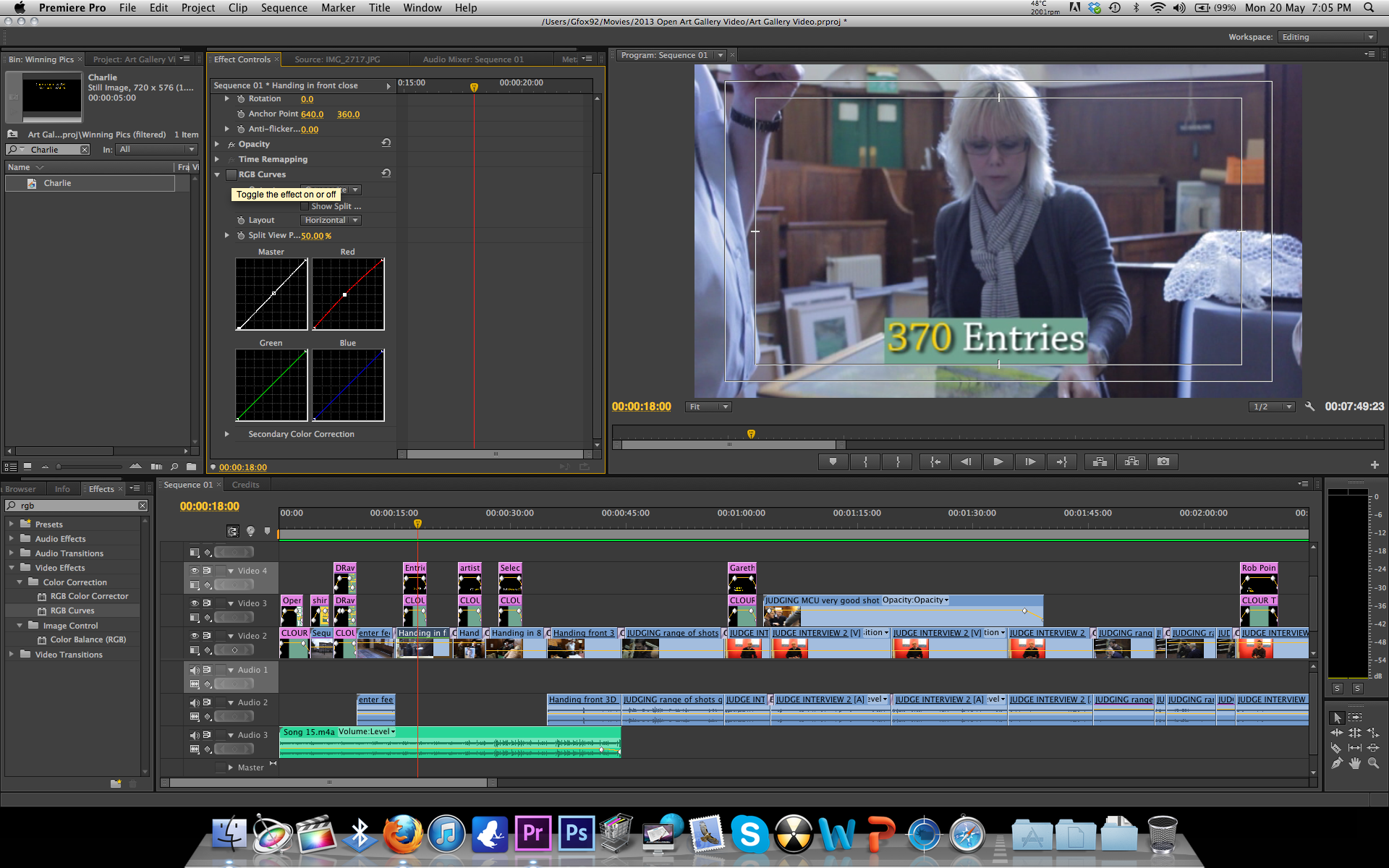
Finished Editing the open art video for the Shire Hall Gallery in Stafford.
I Finished off by colour correcting the video making all shots look very natural as can be seen below.

I Finished off by colour correcting the video making all shots look very natural as can be seen below.
Before
After

Saturday, 16 March 2013
Showreel/Progress
I've decided to start collecting footage for a showreel from past
projects that I have done. I have found footage that shows both my skill
with the camera and my directing skills.
Another thing I have noticed is how much my camera skills and editing skills have improved since last year. My most recent projects contain no camera jerks and the composition of my shots has improved a lot. Editing wise colour correcting has made a big improvement to the quality of my projects. In addition to this I have also improved from 3 years ago in the sense of using After Effects which i have used when necessary this last year and a half.
I now am also more capable of setting up and checking equipment something that has let me down when I first started studying video production. I noticed this as in a video a made 3 years ago the footage was glitchy due to the camera having dirty tape heads when filming and capturing.
Overall I didn't realize how much all aspects of my video production have improved the last 3 years due to experience and what I have learned from college/university.
Another thing I have noticed is how much my camera skills and editing skills have improved since last year. My most recent projects contain no camera jerks and the composition of my shots has improved a lot. Editing wise colour correcting has made a big improvement to the quality of my projects. In addition to this I have also improved from 3 years ago in the sense of using After Effects which i have used when necessary this last year and a half.
I now am also more capable of setting up and checking equipment something that has let me down when I first started studying video production. I noticed this as in a video a made 3 years ago the footage was glitchy due to the camera having dirty tape heads when filming and capturing.
Overall I didn't realize how much all aspects of my video production have improved the last 3 years due to experience and what I have learned from college/university.
Subscribe to:
Posts (Atom)